
ROB RUN Hacks for Windows on Steam
FOV, smoothing, role filters, and radar range are in the same menu. HVCI, TPM, Secure Boot, and Cloud DMA are required on supported builds.
Product Overview
At a glance
Key capabilities
The short list for ROB RUN Cheats, before the full module list.
Another 9 options are in the full list below.
Overview
ROB RUN cheat suite
How the listed modules and the status banner fit a ROB RUN match.
ROB RUN is Kefir’s crime sandbox on Steam. The suite highlights who is a cop, where loot and banks sit, which vehicles are free, and how a heist route looks on radar.
Player ESP adds role tags, wanted state, and held weapons. Vehicle ESP covers owner status, fuel, and locks. After a Kefir update, read the banner on robcheats.net before you launch.
The menu groups player and vehicle ESP, soft aimbot, loot and bank markers, 2D radar, no recoil, and stream-proof overlay controls.
Configuration and support
The menu turns each option on or off and shows the settings that option has. Setup notes ship in the portal. A patch can change which settings remain.
Checkout and delivery
The checkout page confirms the available access options. The portal provides delivery instructions after purchase. Read the status banner before a session.
Updates and compatibility
Compatibility can shift after a ROB RUN update or an anti-cheat change. Check the game version and the banner on robcheats.net before you launch.
Modules
What's included
The full option list for ROB RUN Cheats. Each line can be switched in the menu.
- Player ESP with criminal and cop role tags
- Vehicle ESP with fuel and occupancy
- Soft aimbot with FOV and humanization
- Triggerbot with reaction delay
- Loot, stash, and heist objective markers
- Bank, ATM, and roulette spot helpers
- 2D radar with zoom and filters
- Battle mode and stream-proof overlay
- No recoil and soft no spread
- Config save and load
Experience
Menu layers · After checkout
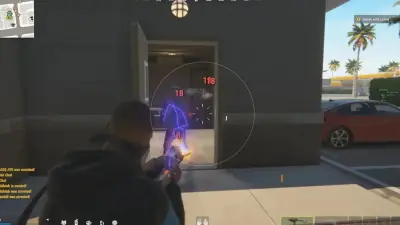
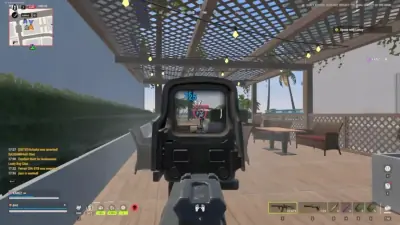
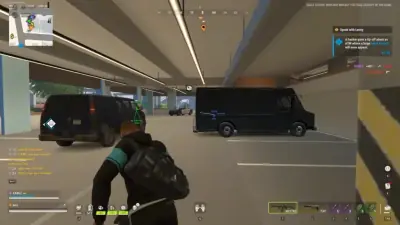
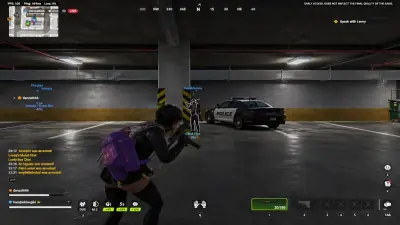
The shots above are the ROB RUN menu. The notes below say what each group does, and how the portal opens after checkout.
In-game layers
- Layer A
ESP in combat
Skeleton ESP and targeting overlay during a street shootout in ROB RUN.
- Layer B
Aimdown sights
First-person aim with match HUD, minimap, and combat feedback in a Looty Bay fight.
- Layer C
Heist awareness
Parking-garage raid with van, police unit, waypoint HUD, and cash-drop timer on screen.
More products
Pairs well with
Utilities sold beside the cheat. Each one keeps a separate page.
- HWID Spoofer After a hardware flag, this license rewrites disk serials. It also rewrites MAC addresses, GPU IDs, and related fingerprints. Trace cleanup is in the same license. View details: HWID Spoofer
- Cloud DMA Cloud DMA may require GREENWARD, Static Server and AWS as separate purchases. Check the full requirements and current price at checkout. View details: Cloud DMA
- Skin Changer A small client paints premium weapon skins on your screen. Outfits and knife variants are included, across the major titles it lists. View details: Skin Changer
FAQ
Questions about this page
Answers for this page. The FAQ page holds the rest.
Blog
Related guides
Filter by topic to find setup guides, feature deep-dives, and patch-day notes.
A plain overview of the ROB RUN cheat menu: what each module does, what you need to run it, and which kind of player gets the most out of it.
ROB RUN ESP covers players, vehicles, loot, hideouts and more. Here is what each part shows and how to keep it from turning into noise.
A settings guide for the ROB RUN soft aimbot, triggerbot and recoil control, written for people who want to configure them rather than guess.
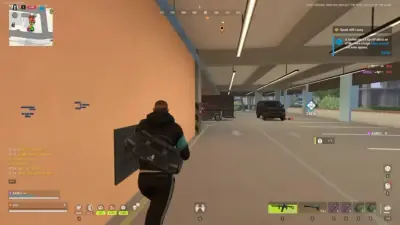
A pre-purchase checklist for ROB RUN cheats, covering the Windows security settings, platform support and the Cloud DMA requirement.
No cheat is risk free. Here is what the ROB RUN product page says about anti-cheat, where to check status, and sensible habits.
Monthly is $35 and Lifetime is $150. A short breakdown of the break-even point and who should choose which plan.
ROB RUN community forum
Read discussion
Forum: Archived, read-only threads on loader setup, ESP configs, patch status, and HWID bans. Replies are closed.
- Cheats and Features What does a ROB RUN cheat actually include? ESP, aimbot, radar and the rest A quick rundown of what a ROB RUN cheat covers, from role tagged player ESP to vehicle markers, radar and soft aimbot, plus which options people actually care about.
- Buying and Pricing ROB RUN cheats price: is the $35 monthly or $150 lifetime key the better deal? Monthly or lifetime for ROB RUN? A simple break even look at the two plans, plus the extra pieces people forget to budget for.
- Status and Updates ROB RUN cheat status after a Kefir hotfix: where do you check before launching? A new ROB RUN patch just dropped. Here is where to check the cheat's status and what to watch for before you launch.
- Cheats and Features Soft aimbot vs triggerbot in ROB RUN: what do FOV, smooth and humanization settings mean? Confused by the aimbot menu? Here is a plain language explanation of FOV, smooth, humanization, bone selection and the triggerbot options for ROB RUN.